

Add an agent on Binance
When you are done, the agent has two keys:
- Its API key, which it signs every proposal with. Mishmar keeps only the public half.
- A trading key on your Binance account: a self-generated Ed25519 API key that you register at Binance. Its private key is never whole anywhere. One half lives with the agent’s signer, the other with Mishmar. An order reaches Binance only when Mishmar’s rules allow it and both halves sign it.
Binance sees an ordinary API key, and you decide at Binance what it may do: let it trade futures, and leave withdrawals off.
It takes about ten minutes.
What you need
Section titled “What you need”- A Binance trading account in Mishmar, with the status Active. Add a Binance trading account has the steps.
- A browser signed in to that Binance account on demo.binance.com, the same account or subaccount whose read-only key Mishmar has, to register the agent’s key.
- The machine the agent runs on, with the mishmar CLI installed.
- The owner or admin role on the Mishmar account. Approvers and viewers cannot set up agents.
- A passkey or a linked wallet on your Mishmar login. Hosted Mishmar asks for a fresh proof of one before adding an agent, issuing its key, adding a trading key or saving a key id. Add one under Profile in the console’s sidebar: Add passkey on this device under Passkeys, or Link this browser’s wallet under Wallets.
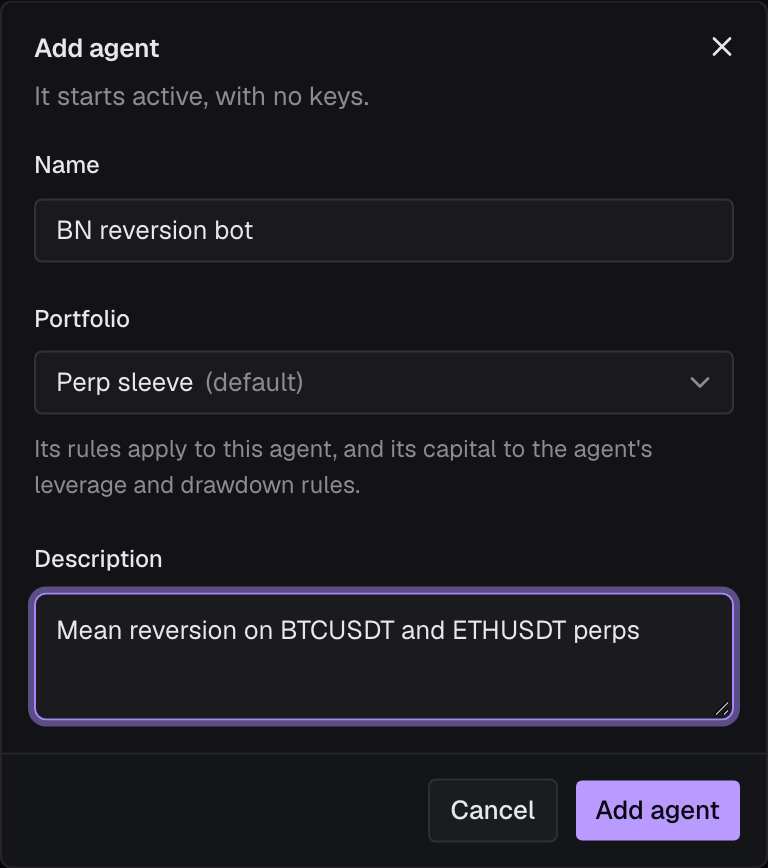
1. Add the agent
Section titled “1. Add the agent”In the console, open Agents and click Add agent.
- Name: what you call the agent everywhere in Mishmar.
- Portfolio: the portfolio’s rules apply to the agent, alongside its own. The account’s default portfolio is preselected.
- Description (optional): what it trades and how.
Click Add agent. The console may ask you to confirm with your passkey or wallet first; the proof lasts ten minutes, so a later step may ask again. The agent’s page opens with the Set up dialog, which walks through the next four steps.
2. Issue its API key
Section titled “2. Issue its API key”Click Issue key.
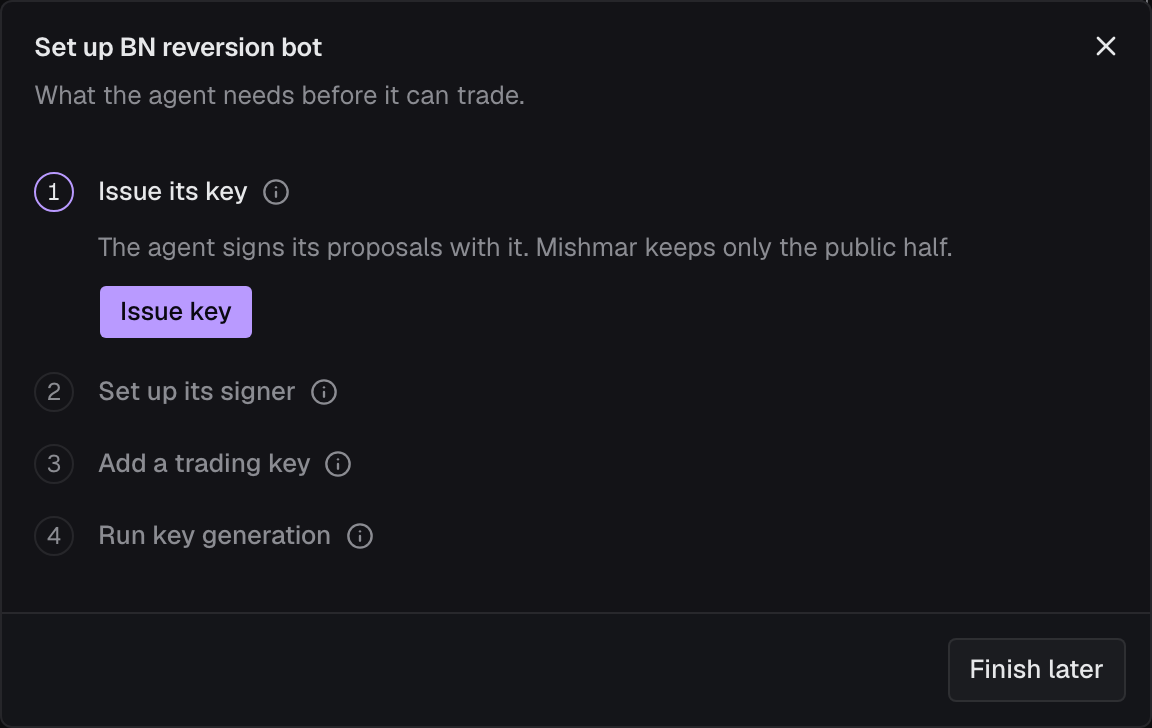
3. Set up the agent’s signer
Section titled “3. Set up the agent’s signer”The dialog shows the key’s secret (it starts with msk_) and a command. The secret is shown once. Copy it before you close the dialog.
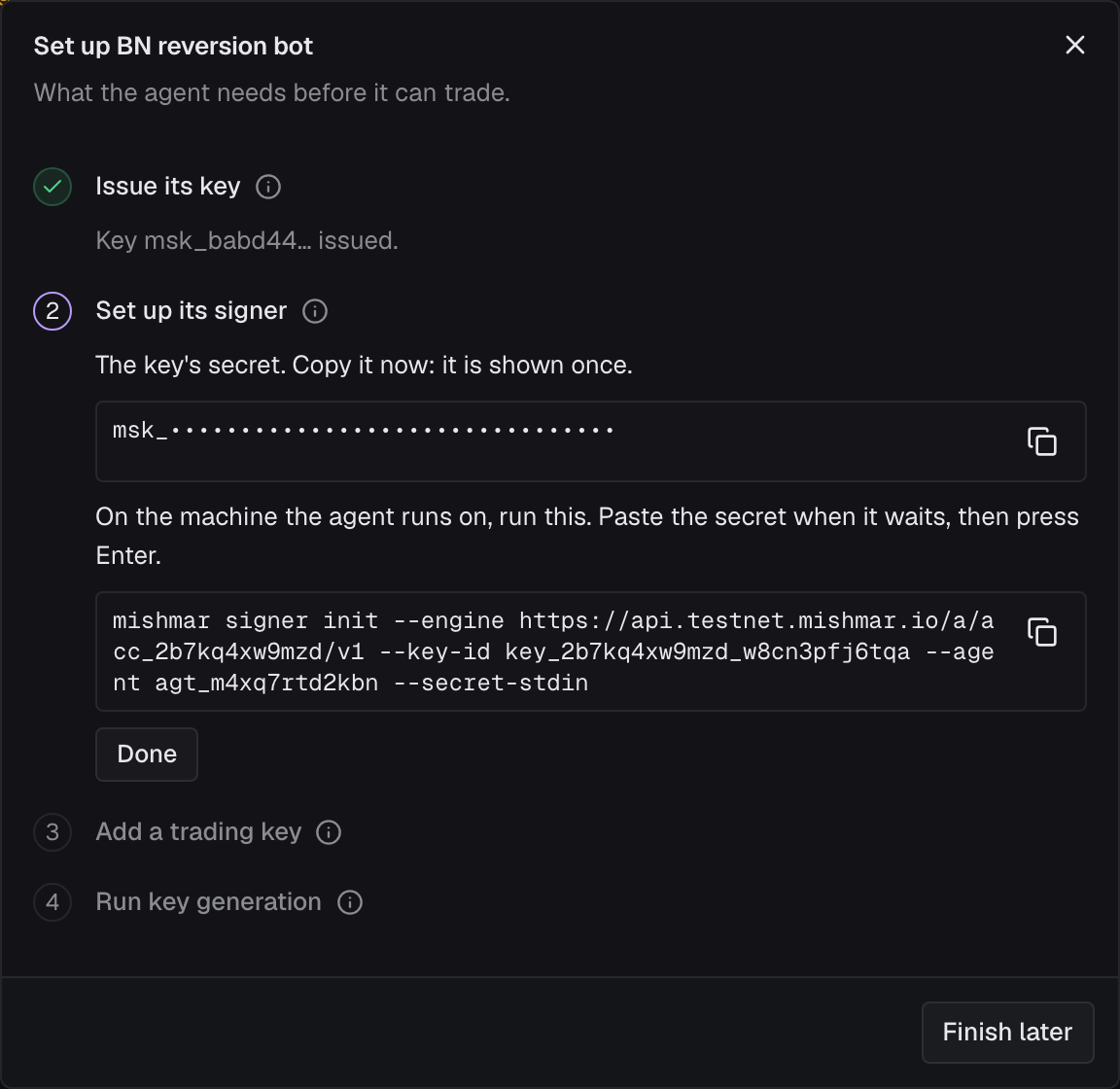
On the agent’s machine, run the command from the dialog. It looks like this, with your own values:
mishmar signer init --engine https://api.testnet.mishmar.io/a/acc_…/v1 --key-id key_… --agent agt_… --secret-stdinIt waits for the secret. Paste it and press Enter. The secret is read from standard input, never from the command line, so it stays out of your shell history. Before writing anything, the command checks the key with Mishmar once, so a secret pasted wrong stops here.
checking key key_… with https://api.testnet.mishmar.io/a/acc_…/v1…the engine accepts key key_…wrote /home/you/.mishmar/agent.json (mode 0600) for agent agt_…, key key_…, engine https://api.testnet.mishmar.io/a/acc_…/v1next, one venue key per trading account, made with the engine's signer: mishmar signer keygen --venue-key vk_… --trading-account ta_… --venue binance mishmar signer keygen --venue-key vk_… --trading-account ta_… --venue hyperliquid --network mainnet|testnetthen: mishmar signer runBack in the dialog, click Done.
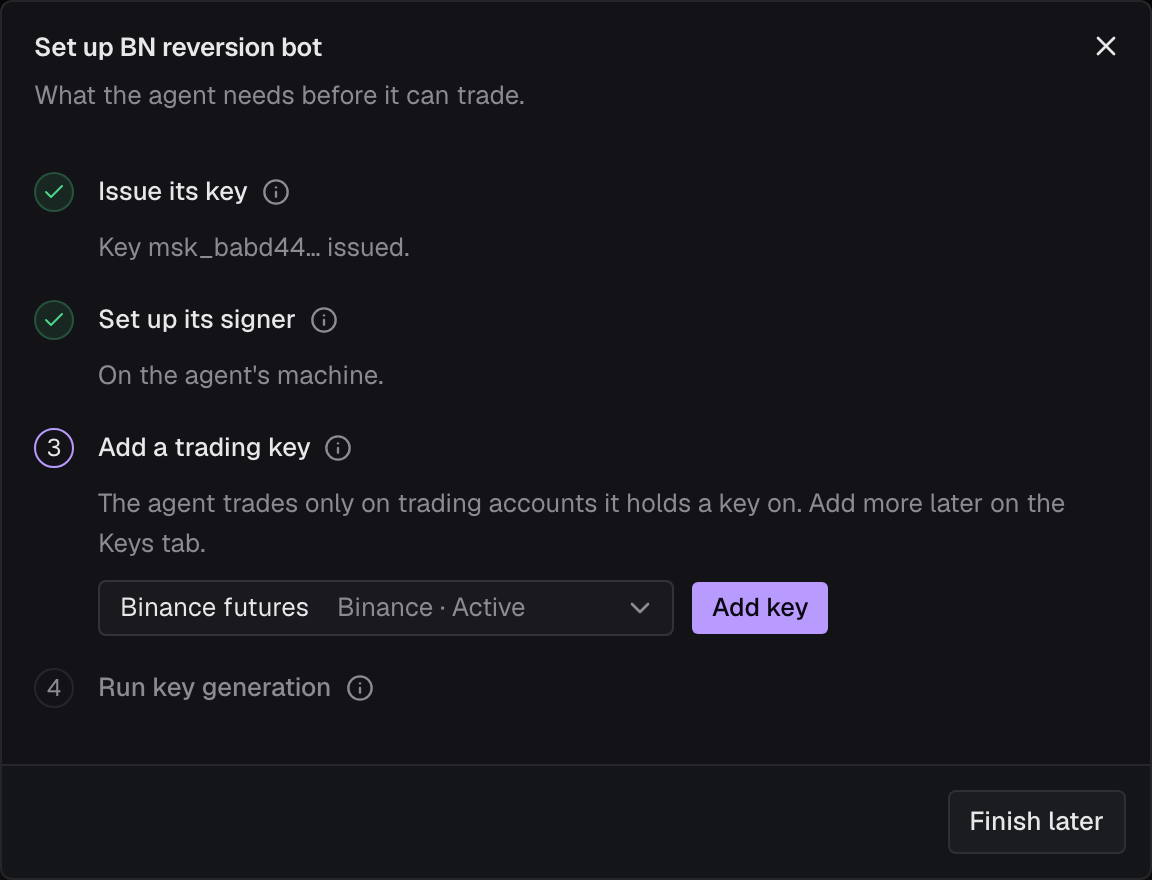
4. Add a trading key
Section titled “4. Add a trading key”Pick your Binance trading account and click Add key. The list shows only trading accounts where this agent has no key yet.
5. Make the key on the agent’s machine
Section titled “5. Make the key on the agent’s machine”The dialog shows a second command. Run it on the agent’s machine:
mishmar signer keygen --venue-key vk_… --trading-account ta_… --venue binanceA Binance key takes no --network: the trading account is on demo trading or live, as the Mishmar it belongs to. Add --config if you used one in step 3.
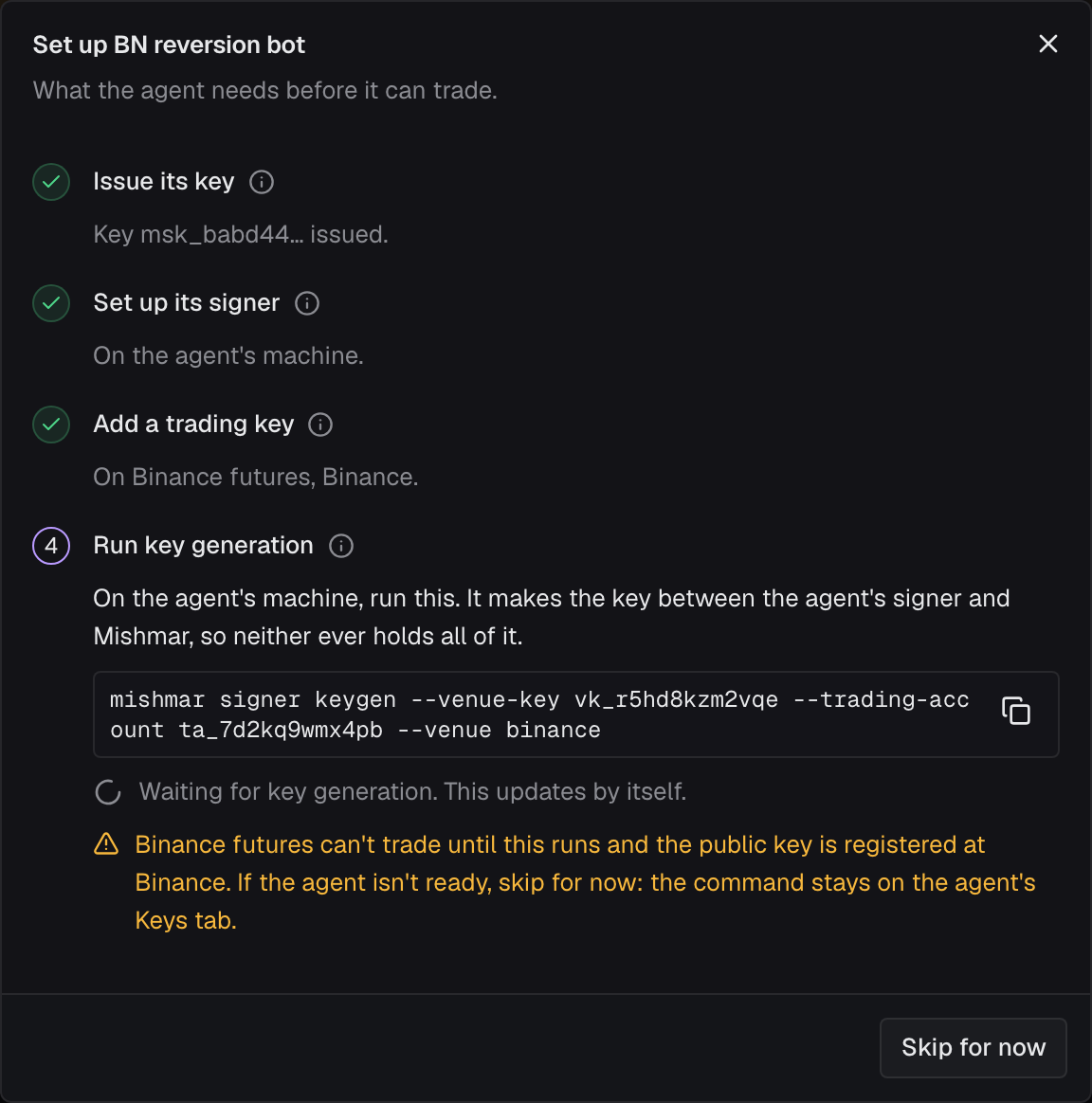
The agent’s signer and Mishmar’s signer each generate a half and run two rounds together (FROST, the IETF’s threshold signing standard). Neither ever sees the other’s half. What comes out is an ordinary Ed25519 public key, whose private key exists only as the two halves. The command prints it:
generated the agent's key for vk_… (binance, trading account ta_…) in /home/you/.mishmar/agent.json register this public key at binance as the agent's trading key (trading only, no withdrawals, IP-restricted to the address the console shows for the trading account, if it shows one): -----BEGIN PUBLIC KEY----- MCowBQYDK2VwAyEA… -----END PUBLIC KEY----- then enter the key id the venue issued in the console (the agent's Keys tab, Register key id) and verify the key with the signer running.The dialog notices by itself: the step shows the public key, and the dialog says Register the public key at Binance, enter the key id it issues, then verify. Click Finish: the rest happens at Binance and on the agent’s Keys tab.
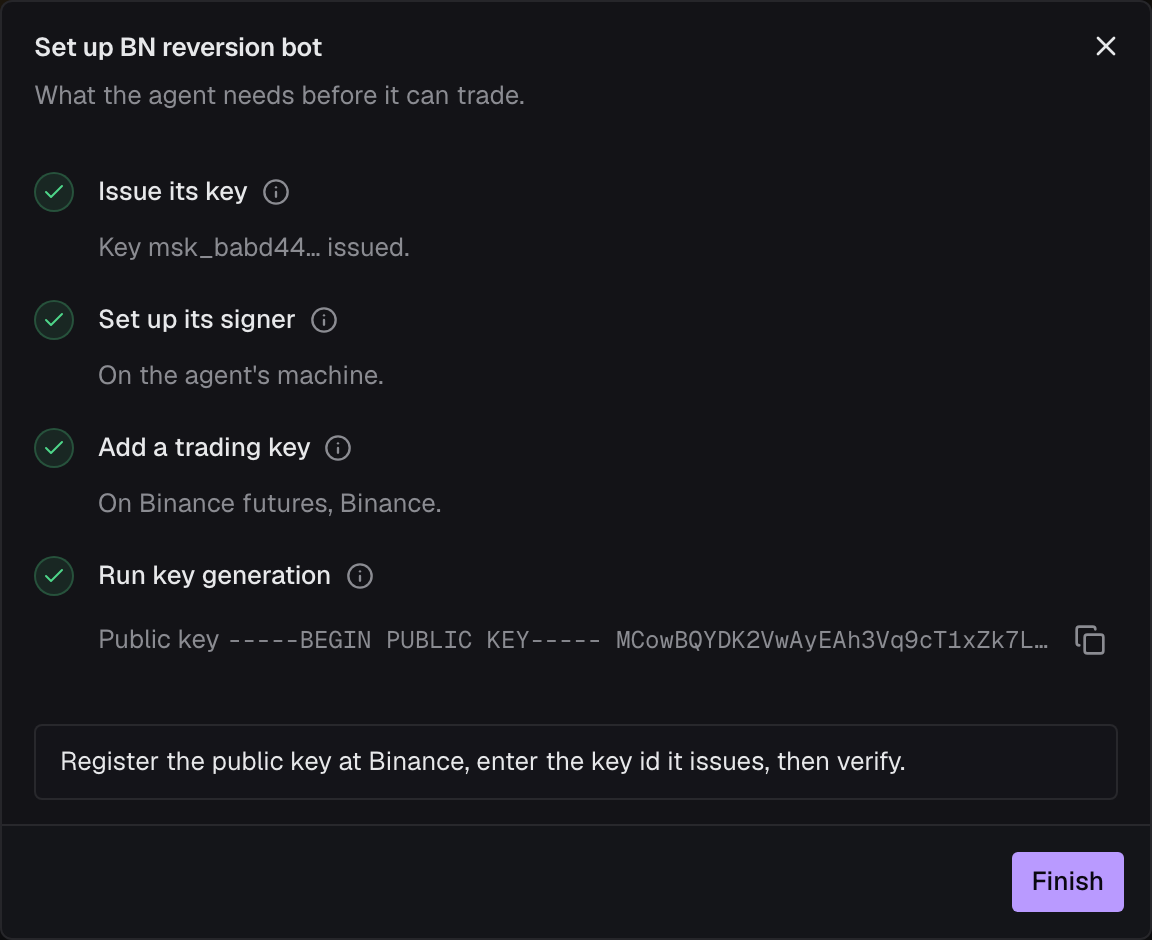
If the agent’s machine isn’t ready yet, click Skip for now. The command stays on the agent’s Keys tab, and the agent cannot trade on this account until it has run and the key is registered.
6. Register the public key at Binance
Section titled “6. Register the public key at Binance”You can copy the public key from the terminal, or from the console: on the agent’s Keys tab, under Trading keys, click › at the start of the Binance row, then the copy button next to Public key.
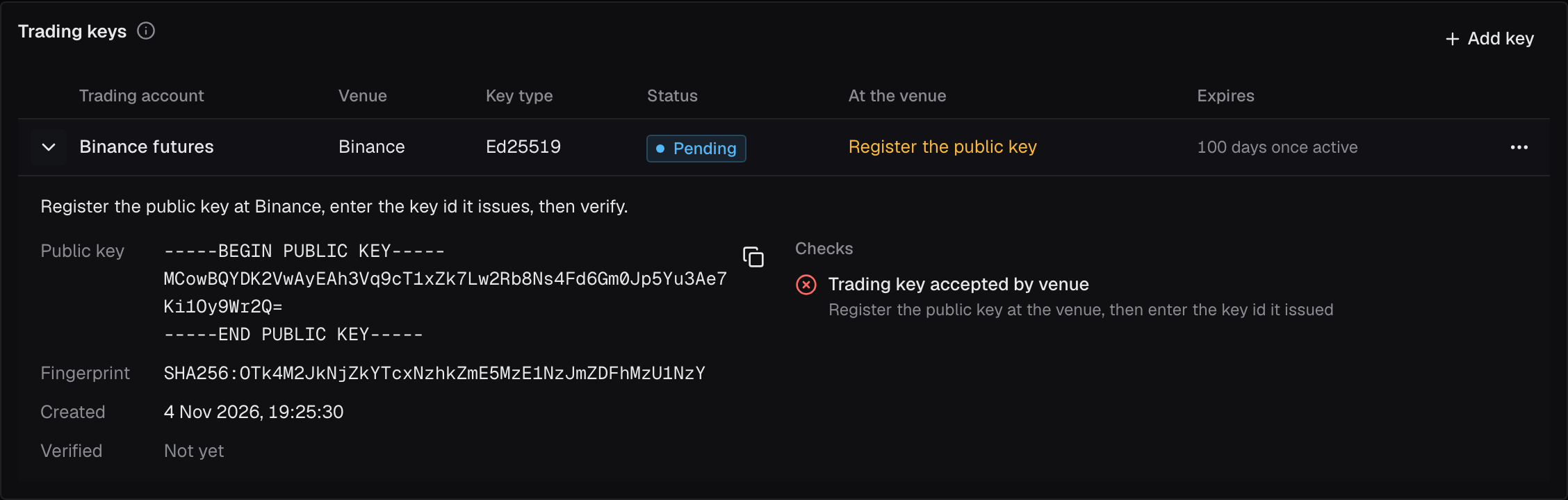
On demo.binance.com, signed in to the account (or subaccount) whose read-only key Mishmar has:
- Under API Management, click Create API and choose Self-generated.
- Paste the public key, all of it, from
-----BEGIN PUBLIC KEY-----to-----END PUBLIC KEY-----. - Give the key permission to trade futures. Leave withdrawals off. Mishmar does not check the withdrawal setting yet, so check it yourself.
- On demo trading, leave the key’s IP access unrestricted: Mishmar shows no address to allowlist there. On a live Mishmar, restrict it to the IP to allowlist on the trading account’s page.
Binance then shows the new key’s API key: a string of letters and digits. That is the key id Mishmar needs. It is an identifier, not a secret: a self-generated key has no secret at Binance, because its private key is the split one.
7. Start the signer
Section titled “7. Start the signer”On the agent’s machine, start the signer and leave it running:
mishmar signer runIt signs only orders this agent proposed and Mishmar allowed, and the read that proves the key in the next step. Orders that wait for your approval need it running, because their second signature comes later.
8. Enter the key id
Section titled “8. Enter the key id”In the console, on the agent’s Keys tab, click ⋯ on the Binance row under Trading keys and choose Register key id. Paste the key id into Key id issued by Binance and click Save and verify.
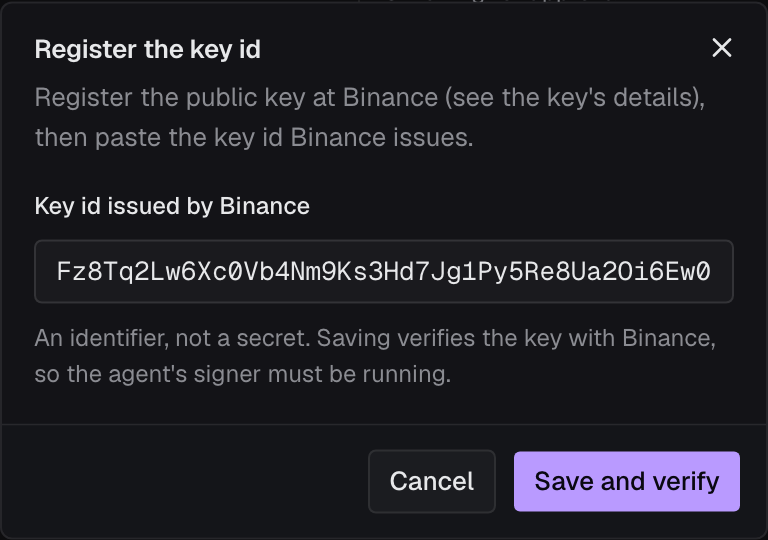
Mishmar saves the key id, then proves the key end to end: it asks the agent’s signer to co-sign a read of the account and sends it to Binance under the new key. When Binance accepts it, the key is Active and the toast says …: key id saved and verified. The agent can trade on this account.
If the signer wasn’t running, the key id stays saved and the toast says …: key id saved, not verified. with the reason. Start the signer, then click ⋯ on the row and choose Verify.
9. Place a test order
Section titled “9. Place a test order”In a second terminal on the agent’s machine, propose a small limit buy a few percent under the market, so it rests on the book and does not fill. Use your trading account’s id (ta_…, on its page in the console) and a price about 3% under BTCUSDT’s current price:
mishmar propose --config ~/.mishmar/agent.json --trading-account ta_… --symbol BTCUSDT --side buy --size 0.001 --price 75000The output looks something like this. Your rules and numbers will differ.
decision dec_…: allow buy 0.001 BTCUSDT on binance, notional 75, latency 2.10 ms, revision 12 passed Max order size order_size observed 75, limit 150 signing: signed (one-shot: the agent's half came with the proposal) venue: resting order 28665991418 at 2026-11-04T16:26:54ZThe order is on Binance’s book, and the decision is on the console’s Decisions page. To pull it, copy its Client order id (msh-…) from the decision’s page and run:
mishmar propose --config ~/.mishmar/agent.json --trading-account ta_… --symbol BTCUSDT --cancel msh-…Binance refuses an order worth less than its minimum for the symbol, $50 on BTCUSDT on demo trading at the time of writing. At 0.001 BTC, keep the price above $50,000.
From your agent’s code
Section titled “From your agent’s code”The Python and TypeScript SDKs start the signer for you as a child process, with the same config file. The bot itself never holds a key. Only one signer runs per config file, so stop the mishmar signer run from above first.
from mishmar import Signer
with Signer() as s:  # ~/.mishmar/agent.json, or Signer("path/to/config.json")    d = s.order("ta_…", "BTCUSDT", "buy", "0.001", price="75000")    if d["verdict"] == "require_approval":        d = s.wait(d["id"])
For an LLM agent, mishmar mcp serves the same actions as MCP tools. The repository’s README covers both.
Check it worked
Section titled “Check it worked”- The agent’s page shows no Setup isn’t finished warning.
- On the agent’s Keys tab, API keys lists the
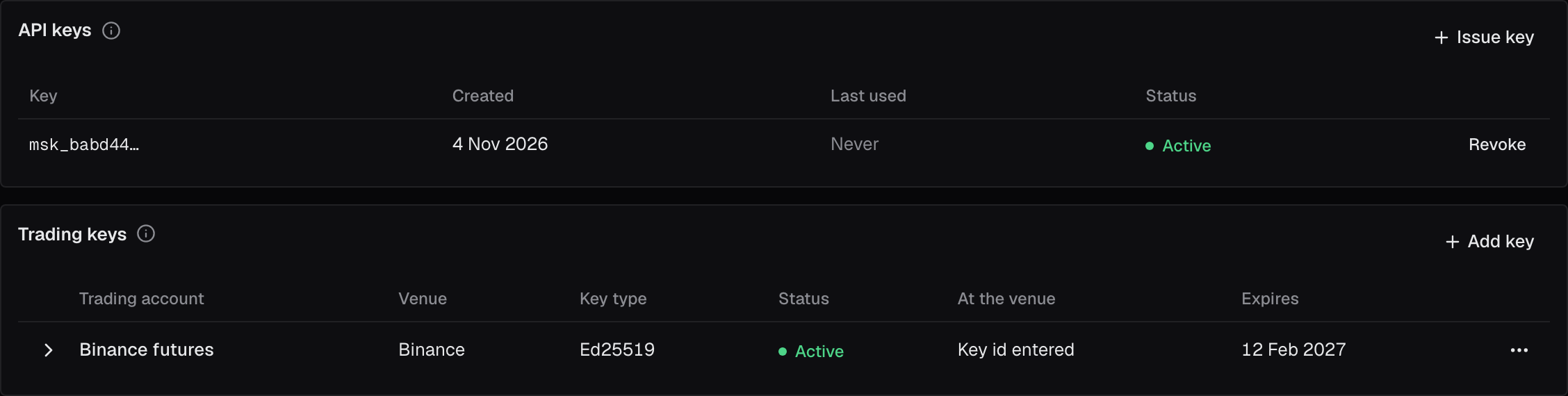
msk_…key as Active, and Trading keys lists the Binance trading account with key type Ed25519, Active, Key id entered under At the venue, and the date the key expires under Expires. - On Binance, API Management lists the self-generated key.
When something goes wrong
Section titled “When something goes wrong”… exists already; add venue keys to it with "mishmar signer keygen", or pass --config for another file: the machine already has an agent’s config. Give this agent its own file with--config, as in step 3.the engine does not accept key key_… (…): the secret pasted is not that key’s, or the key was revoked. Nothing was written. Copy the secret again and rerun the command; if it is lost, see the next item.- The secret is lost before
signer initran. On the Keys tab, revoke the key under API keys, then Issue key again. This needs a passkey or a wallet. Add one under your profile, then try again.: your Mishmar login has neither. Open Profile, add a passkey or link a wallet, then try the step again.- Key generation stopped partway (the network dropped, the machine slept). The key still shows Key generation pending. Run the same
mishmar signer keygencommand again. …: key id saved, not verified. The agent's signer is not connected; start it and verify again: startmishmar signer run(step 7), then click ⋯ on the key’s row and choose Verify.…: key id saved; 1 of 2 checks still failing, and the key’s check Trading key accepted by venue saysRefused by Binance: …with Binance’s reason. Check at Binance that the key is the self-generated one with this public key, on the same account as the read-only key, and, on a live Mishmar, that its IP restriction includes the address Mishmar shows. Then choose Verify again. If the key id was pasted wrong, click ⋯ on the row, choose Change key id, paste the right one and click Save and verify: it can be changed until the key is active.- The check says
Accepted by Binance, co-signed by the agent's signer; the account cannot trade: the key works but Binance says it can’t trade. Give it permission to trade futures at Binance, then choose Verify again. a signer is running with … : restart it so it uses the new key: you made the key while the agent’s signer was running. Stop it and start it again.- An order comes back with
signing: unreachable. The order needed the signer and none was running. Startmishmar signer run(or the SDK’sSigner) and propose again. - An order comes back
allowwith(Not forwarded: …): Mishmar’s rules allowed it, but Binance refused it, in the words afterNot forwarded:. A size under the symbol’s minimum is the usual reason. Change the order and propose again. Agent …'s key on trading account … has expired; give the agent a new key: see When the key expires.The account's plan holds 1 agent; delete one or move to a larger plan. The free plan holds one agent and one trading account, and Add agent is greyed out with the reason beside it. Delete one, or move to a larger plan.- An order comes back
rate_limited:The account's request budget for binance is spent for now; send it again in … s. Exits and cancels still go. Each plan has a share of what Binance lets one address send. The SDKs andmishmar signer runsend the order again after the wait. - The trading account says New orders are blocked: Mishmar has lost the venue’s stream of this account’s fills and orders. While Mishmar can’t see the account’s fills and orders, it blocks new risk. Closing positions still works. Trading starts again by itself once the stream is back; if it hasn’t within a few minutes, tell us.
When the key expires
Section titled “When the key expires”Every trading key expires 100 days after it became active, on every venue. The date is under Expires on the agent’s Keys tab. In the key’s last week the date turns amber, the agent’s page and its row in Agents warn, and Mishmar emails the account’s owner and admins 7, 2 and 1 days before. Once the date passes, the key is Expired: Mishmar never signs with it again, and the agent can’t trade on this account. Binance still lists the API key, but it can sign nothing without Mishmar’s half.
Replace the key before then:
- On the agent’s page, click Replace key, in the warning or under ⋯ on the key’s row.
- Click Add new key. The current key keeps working.
- On the agent’s machine, run the
mishmar signer keygencommand the dialog shows. If the agent’s signer is running, restart it so it has the new key. - Register the new public key at Binance as in step 6, paste the key id Binance issues into Key id issued by Binance, and click Save and verify. The agent’s signer must be running.
The moment the new key is active, Mishmar revokes the old one, and the agent trades on through the change. An order the agent built with the old key in the seconds after can be refused; propose it again. Then delete the old key at Binance.
If the key has already expired, the warning offers Make a new key, with the same steps. The agent can’t trade on this account until the new key is active.
Taking the key away
Section titled “Taking the key away”On the agent’s Keys tab, click ⋯ on the trading key’s row and choose Revoke. Mishmar stops signing with it at once, and without Mishmar’s half the key can sign nothing. Delete it at Binance as well, so it no longer appears there.